Instant Download – Instagram Reels, YouTube Shorts & Video Downloader
Instant Download service for Instagram Reels, YouTube Shorts & Videos, Twitter (X), Snapchat & TikTok in HD 1080p — fast, free, no login, no watermark.
No account. We don't save your links or files.
Enter a public Instagram username to fetch their full-resolution profile picture.
yt-dlp will read active login cookies from this
browser.
Select a cookie file (e.g.
www.instagram.com_cookies.txt) from the project directory.
Paste the content of an exported Netscape cookie file, OR paste the
raw 'Cookie' header string from your browser's Developer Tools Network tab.
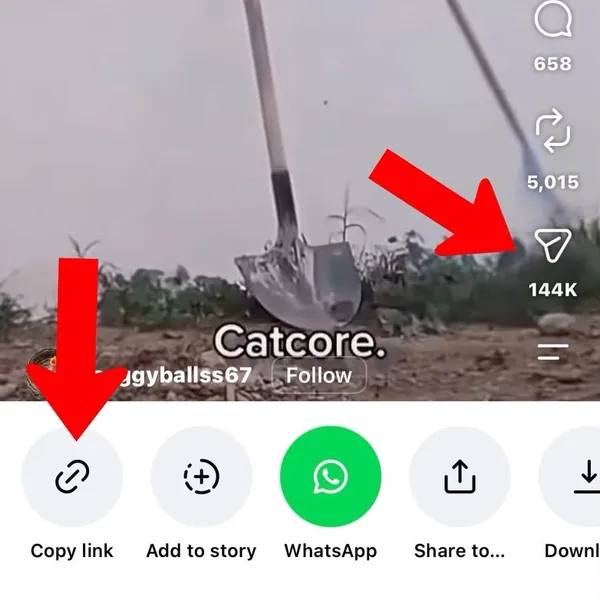
How It Works
Simple 3-step process to download any media in seconds.
1
Copy Link
Open any app or website and copy the link of the video or post you want.
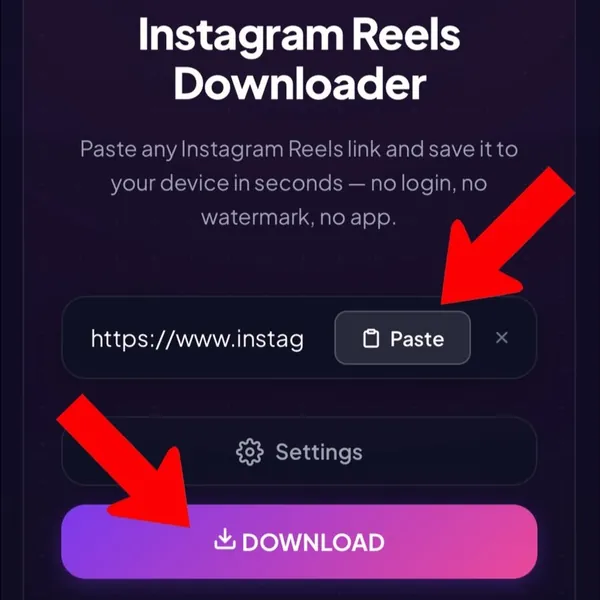
2
Paste Here
Paste the link into the box above — we will process it instantly.
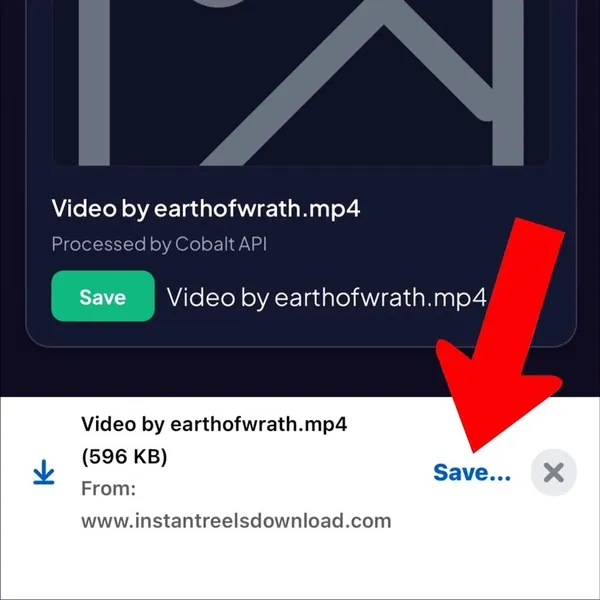
3
Download
Click the download button to save the file straight to your device.
⚡ Best Free Instagram Reels, YouTube Shorts & Video Downloader (No Watermark 1080p HD)
Welcome to InstantReelsDownload.com — the world's fastest free online downloader for Instagram Reels, YouTube Shorts & Videos, TikTok (No Watermark), Twitter (X), Snapchat, Facebook, and Pinterest. Save high-resolution 1080p Full HD MP4 videos and 320kbps MP3 audio directly to your mobile phone, iPhone, Android, or PC in seconds! 🚀
📸 Instagram Reels Downloader
Download IG Reels, Stories, Photos, Audio MP3 & Highlights in original 1080p quality without login.
▶️ YouTube Shorts & Video
Save vertical YouTube Shorts & full HD videos directly to your device gallery or downloads folder.
🎵 TikTok Without Watermark
Download TikTok clips in clean MP4 without watermark logo, watermark-free & instant.
Open Instagram, YouTube, TikTok, or Twitter, tap Share, and tap "Copy Link".
2
📌 Paste Here
Paste the link into the search box above at InstantReelsDownload.com.
3
📥 Save HD Video
Click DOWNLOAD to save your watermark-free 1080p MP4 video straight to phone gallery or PC!
🔒 100% Secure & Private
No registration, no password, no account required. We never track or store your downloaded files.
🌟 Original 1080p Full HD
Extracts uncompressed source streams directly from CDNs for maximum clarity and audio sync.
📱 Works on All Devices
Fully compatible with iPhone, iPad, Android, Windows PC, Mac, Chrome, Safari, and Firefox.
Pinterest Video Downloader – Save HD Videos, Pins & Idea Pins Free
Pinterest is one of the world's most popular platforms for creative inspiration, design ideas, fashion mood boards, and DIY tutorials. However, the official Pinterest app only lets you bookmark pins inside the app. Our Pinterest Video Downloader solves this by allowing you to extract and save original MP4 videos, full-resolution HD image pins, and multi-page Idea Pins directly to your phone or computer for permanent offline access.
How to Download Pinterest Videos on Any Device (Step-by-Step)
Downloading Pinterest videos, Idea Pins, and high-res images is fast and straightforward across mobile and desktop devices. Follow these simple steps tailored for your operating system:
iPhone & iPad (iOS)
Open the Pinterest app, tap the Share icon on your pin, and select "Copy Link".
Open Safari Browser, visit instantreelsdownload.com, and paste the link in the search box.
Tap Download. When Safari displays the download prompt, tap "Download".
Tap the Safari downloads icon at top-right, open the file, and select "Save Video" for Camera Roll.
Android Devices
In the Pinterest app, tap the 3 dots (•••) menu on the pin and choose "Copy Link".
Open Google Chrome or any browser and paste the link in our search bar.
Click the Download button to start direct HD extraction.
Your file saves instantly into your phone's "Downloads" folder and indexes in your Gallery.
Windows PC
Open pinterest.com in your desktop browser and copy the URL from the address bar.
Paste the URL into InstantReelsDownload and hit the Download button.
Click the output Download MP4 / Image button to trigger the browser save.
The file will land directly in your PC's default Downloads folder in full HD.
Apple Mac (macOS)
Copy the pin link using Cmd + C or right-clicking the share menu in Safari / Chrome.
Paste the link into InstantReelsDownload and click Download.
Click the download button to save the uncompressed file directly.
Your high-res MP4 video or photo will land straight in your Mac's Downloads folder.
Why Use InstantReelsDownload for Pinterest Video Extraction?
Whether you're a professional designer saving UI references, a crafter keeping step-by-step video tutorials, or an event planner collecting mood board assets, our downloader ensures your inspiration library remains permanently saved on your local storage — even if original pins are later deleted or modified.
Video Pins → HD MP4Download standard video pins and story pins in 720p or 1080p MP4 without watermarks.
Q: How do I copy a Pinterest pin link to download?
On the Pinterest app: open the pin, tap the 3-dot menu or Share icon, and select "Copy Link". On desktop browsers: simply copy the full URL from your browser's address bar. Short pin.it links are fully supported.
Q: Can I download Pinterest images in full original resolution?
Yes! Pinterest stores images in multiple compressed sizes for feed previews (236px, 564px, 736px). Our tool automatically targets the /originals/ resolution file — the exact untouched file uploaded by the original pinner.
Q: What are Idea Pins and can I save them?
Idea Pins (formerly Story Pins) are Pinterest's multi-page story format. Our downloader parses Idea Pins and extracts each page into downloadable MP4 video loops or high-res images.
Q: Do pin.it short links work on InstantReelsDownload?
Yes. You can paste pin.it short URLs directly into the search bar. Our backend automatically resolves short links to their full Pinterest post endpoint before extraction.
Q: Can I download videos from secret or private Pinterest boards?
Our tool extracts media from publicly visible pins. Pins located inside private or secret boards requiring account login cannot be accessed. Ensure the pin is publicly viewable.
Q: What file formats are downloaded from Pinterest?
Video pins are downloaded as clean MP4 files. Image pins are saved in their original format (JPG, PNG, or WebP) with zero re-encoding or quality loss.
Q: Is downloading Pinterest content free and legal?
Yes! Our service is 100% free with no hidden fees or daily limits. Downloading pins for personal reference, offline crafting, or mood boards is standard fair use. Commercial redistribution without creator permission is not recommended.
Q: How do I save downloaded Pinterest videos directly to my iPhone Camera Roll?
After clicking Download in Safari, tap the circular downloads icon at the top right of Safari, select the downloaded MP4 file, tap the Share icon, and choose "Save Video". The video will appear in your Photos app / Camera Roll immediately.
Q: Where do downloaded Pinterest files go on Android smartphones?
On Android, files are saved directly into your device's default Downloads folder. They will also automatically index and display in your Google Photos, Samsung Gallery, or default File Manager app.
Q: Can I download Pinterest videos on Mac without installing any apps or extensions?
Yes! InstantReelsDownload runs 100% online in Safari, Chrome, Edge, or Firefox on macOS. You don't need any third-party apps, software, or extensions — simply copy the pin URL, paste it into our search bar, and download the MP4 file directly to your Mac.
YouTube Video Downloader – Download YouTube Videos in HD 1080p Free
YouTube is the world's largest video platform, hosting millions of tutorials, music videos, educational lectures, and documentary films. However, YouTube Premium offline downloads remain locked inside the YouTube app and expire over time. Our YouTube Video Downloader extracts and saves full-length YouTube videos directly to your device as permanent MP4 files in crisp 1080p Full HD resolution with fully synced audio tracks — 100% free with no registration required.
How to Download YouTube Videos on Any Device (Step-by-Step)
Follow these simple device-specific steps to save your favorite YouTube videos directly to your phone or computer:
iPhone & iPad (iOS)
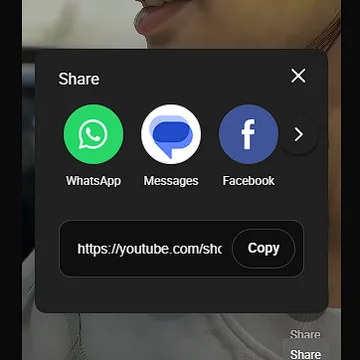
Open the YouTube app, tap Share on the video, and select "Copy link".
Open Safari Browser, go to instantreelsdownload.com, and paste the URL into the search field.
Tap Download and select your preferred MP4 resolution (1080p, 720p).
Tap Safari downloads icon, open the MP4 file, and select "Save Video" to store it in Camera Roll.
Android Devices
In the YouTube app, tap Share below the video player and tap "Copy link".
Launch Google Chrome, paste the link in our search bar, and press Download.
Choose your MP4 resolution and hit Download MP4.
The video file saves directly into your phone's Downloads folder and Gallery app.
Windows PC & Mac
Copy the video URL directly from your browser's address bar on youtube.com.
Paste the link into InstantReelsDownload and click the Download button.
Select 1080p or 720p resolution and start the instant browser save.
The file lands directly in your PC or Mac's Downloads folder ready for offline playback.
Full HD 1080p MuxingCombines high-definition video streams and audio tracks cloud-side for crisp playback.
Audio Extractor (MP3)Optionally convert and download standalone high-bitrate MP3 music & podcast tracks.
No Apps or PluginsRuns 100% online in your browser without requiring Chrome extensions or software installs.
Q: Is there any charge to download YouTube videos on InstantReelsDownload?
No, our YouTube downloader service is 100% free with unlimited downloads, zero hidden fees, and no account registration.
Q: Do downloaded YouTube videos contain watermarks or logos?
No! All extracted videos are clean, uncompressed MP4 files without any added watermarks or overlay logos.
Q: Why do some 1080p YouTube downloaders produce videos without sound?
YouTube stores 1080p video tracks and high-quality audio tracks as separate data streams. Basic downloaders fail to merge them. Our backend automatically muxes video and audio cloud-side so your downloaded 1080p MP4 plays full audio seamlessly.
Q: How do I save YouTube videos directly to my iPhone Camera Roll?
Open Safari on iOS, paste the YouTube video link, tap Download, select 1080p or 720p MP4, and tap Download. Once complete, tap the Safari downloads icon, open the video file, tap Share, and choose "Save Video".
Q: Where do YouTube downloads save on Android and Windows PC?
Files save directly into your operating system's default Downloads folder. On Android devices, downloaded videos will also automatically index in your Photos or Gallery app.
Q: Can I extract MP3 audio music from YouTube videos?
Yes! Simply select the MP3 audio option before clicking Download. Our engine will convert the audio track into a 320kbps MP3 file.
Q: Is downloading YouTube videos legal for personal use?
Downloading YouTube videos for personal offline watching, educational reference, or travel viewing is standard fair use. Commercial distribution without creator permission should be avoided.
YouTube Shorts Downloader – Save Shorts Videos Online HD Free
YouTube Shorts are rapid, engaging vertical video loops under 60 seconds. However, the official YouTube app does not allow direct video file saving for offline editing or sharing. Our YouTube Shorts Downloader extracts uncompressed 1080p vertical MP4 videos directly from YouTube servers without watermarks.
How to Download YouTube Shorts on Any Device (Step-by-Step)
iPhone & iPad (iOS)
Tap Share on the Short in the YouTube app and tap "Copy link".
Open Safari, go to instantreelsdownload.com, and paste the Shorts URL.
Tap Download and confirm the Safari browser download.
Open the downloaded MP4 in Safari downloads and choose "Save Video" for Camera Roll.
Android Devices
Tap the Share icon on the YouTube Short and select "Copy link".
Open Chrome, paste into our search bar, and click Download.
Click the output download link to save the vertical MP4 file.
The video appears immediately in your phone's Downloads and Gallery.
Windows & Mac PC
Copy the Shorts link from the address bar on youtube.com/shorts/....
Paste into InstantReelsDownload and click Download.
Click Download MP4 to save the clean vertical video to your desktop.
The file saves in your computer's default Downloads directory.
Vertical 9:16 FormatPreserves original mobile vertical video composition for TikTok/Reels re-sharing.
Zero WatermarksClean MP4 output without added branding or username overlays.
MP3 Audio ExtractorExtract trending background music tracks from Shorts into standalone MP3 audio.
Instant ProcessingFetches source CDN video streams in under 3 seconds.
By The Numbers
Trusted by millions for fast, high-quality, watermark-free media downloads.
TikTok Video Downloader – Save TikTok Videos Without Watermark HD
TikTok is home to viral dance trends, funny skits, and creative short videos. However, saving videos directly through the TikTok app adds a bouncing watermark and logo over the video. Our TikTok Video Downloader extracts original MP4 video streams directly from TikTok CDN servers without watermarks in HD 1080p quality.
How to Download TikTok Videos Without Watermark on Any Device
iPhone & iPad (iOS)
Open TikTok app, tap Share (arrow) icon, and select "Copy Link".
Open Safari Browser, go to instantreelsdownload.com, and paste the URL.
Tap Download and confirm the Safari browser download.
Open the downloaded MP4 in Safari downloads, tap Share, and select "Save Video" for Camera Roll.
Android Devices
In the TikTok app, tap Share and tap "Copy link".
Open Chrome, paste into our search bar, and tap Download.
Click the output download link to save the no-watermark MP4 file.
Your video saves directly into your phone's Downloads folder and Gallery app.
Windows & Mac PC
Copy the video URL directly from your desktop browser on tiktok.com.
Paste the link into InstantReelsDownload and click Download.
Click Download MP4 to save the clean video without watermark.
The MP4 file lands in your computer's Downloads directory.
No TikTok WatermarkRemoves bouncing TikTok logo and creator handle overlays completely.
Original HD QualityDownloads raw MP4 video streams at native upload resolution.
Q: Are TikTok videos downloaded completely without watermarks?
Yes! Our downloader strips out the TikTok username overlay and bouncing logo watermark for clean video archiving.
Q: How do I copy a TikTok link on mobile?
Open TikTok, tap the Share (arrow) icon on the video, and tap "Copy link".
Q: How do I save TikTok videos to my iPhone Camera Roll?
Open Safari, paste the TikTok link, click Download, tap the Safari downloads icon, open the video, tap Share, and select "Save Video".
Q: Where do downloaded TikTok videos save on Android?
Downloaded MP4 files save into your phone's default Downloads folder and show up in Google Photos / Gallery automatically.
Q: Can I extract MP3 audio background sounds from TikTok videos?
Yes! Select MP3 format before hitting Download to extract standalone audio tracks.
Q: Can I download TikTok videos if the creator disabled the save option?
Yes! If a creator disabled the in-app save button, our tool can still extract the publicly viewable video stream.
Twitter (X) Video Downloader – Save Twitter (X) Videos & GIFs HD Free
Twitter (now X) is a fast-paced global real-time news platform where journalists, influencers, and meme creators publish viral clips and animations. Our Twitter Video Downloader extracts high-resolution MP4 videos and animated GIFs from any tweet directly to your device without requiring an X account or software installation.
How to Download Twitter (X) Videos on Any Device
iPhone & iPad (iOS)
Tap the Share icon under the tweet on X app and select "Copy Link".
Open Safari, visit instantreelsdownload.com, and paste the tweet link.
Tap Download and choose your target video resolution (1080p, 720p).
Save the MP4 video to your iPhone Camera Roll via Safari downloads menu.
Android & Windows PC
Copy tweet URL on the Twitter/X app or browser address bar.
Paste the link into InstantReelsDownload search bar and click Download.
Select MP4 quality (1080p, 720p, or 480p) to trigger instant file save.
The video file lands directly in your device's Downloads folder.
Multi-Bitrate ResolutionsChoose between 1080p, 720p HD, and compact 480p MP4 formats.
Twitter GIF ExtractorExtract animated Twitter GIFs into standard playable MP4 loops.
Fast CDN FetchingConnects to Twitter video distribution networks in milliseconds.
Zero Ads & WatermarksClean MP4 output with no logos or popups added.
By The Numbers
Trusted by millions for fast, high-quality, watermark-free media downloads.
Yes! Twitter internally converts GIFs into MP4 loops; our downloader extracts them as high-quality, playable MP4 files.
Q: How do I copy a tweet video link on mobile?
Tap the Share button beneath the tweet in the X app, then tap "Copy Link".
Q: How do I save Twitter videos to my iPhone Camera Roll?
In Safari, download the MP4 file, tap Safari's download manager, open the video, tap Share, and choose "Save Video".
Q: Can I download videos from private Twitter accounts?
No. For user privacy and security, our downloader works exclusively on publicly accessible tweets.
Q: Is an X (Twitter) account required to download videos?
No! You can download videos anonymously without logging into X or creating an account.
Q: What video formats are supported for Twitter downloads?
All Twitter videos are converted into standard universal H.264 MP4 files compatible with all phones, tablets, and computers.
Threads Video Downloader – Download Threads Videos & Photos Free
Instagram Threads is Meta's text and media conversation platform. Our Threads Video Downloader provides a fast, hassle-free way to extract original HD videos and high-res image carousels from Threads posts directly to your smartphone or laptop gallery.
How to Download Threads Videos on Any Device
iPhone, Android & PC
Tap the paper airplane Share icon on the Threads post and select "Copy Link".
Paste the link into InstantReelsDownload and click Download.
Click Download MP4 to save the clean video file.
Save the video directly to your Camera Roll or Downloads directory.
By The Numbers
Trusted by millions for fast, high-quality, watermark-free media downloads.
Q: Is a Threads account required to download videos?
No! You can download videos and media from any public Threads post anonymously without logging in.
Q: How do I save Threads videos to my iPhone Photos app?
Use Safari browser, download the video file, tap Safari's downloads icon, open the MP4 file, tap Share, and select "Save Video".
Q: Are Threads photo carousels supported?
Yes! Our tool extracts both full HD videos and original resolution photos from multi-slide Threads posts.
Q: Where do Threads downloads save on Android phones?
On Android, files save into your default Downloads folder and show up immediately in Google Photos / Gallery.
Facebook Video Downloader – Save FB Videos & Reels HD Free
Download public Facebook timeline videos, Watch clips, and FB Reels online in crisp HD resolution. InstantReelsDownload offers a seamless, secure, and browser-based Facebook video extractor with zero login requirements.
How to Download Facebook Videos on Any Device
Mobile & PC
Tap Share on the Facebook video or Reel and select "Copy Link".
Paste into our input field and click Download.
Choose HD or SD quality to save the MP4 video directly.
By The Numbers
Trusted by millions for fast, high-quality, watermark-free media downloads.
Our tool works exclusively on publicly visible Facebook videos and Reels for privacy protection.
Q: Are Facebook Reels supported?
Yes! Copy the Reel link from Facebook and paste it here to download the high-definition MP4 file.
Q: How do I save Facebook videos to iPhone Camera Roll?
Open Safari, download the video MP4 file, tap the Safari downloads icon, open the file, tap Share, and select "Save Video".
Q: Is a Facebook login required to download videos?
No! InstantReelsDownload operates 100% anonymously without requiring Facebook credentials.
Snapchat Video Downloader – Save Spotlight & Public Videos HD
Snapchat Spotlight is filled with creative short clips and viral public stories. Our Snapchat Video Downloader allows you to download public Snapchat Spotlight videos and public story clips directly in clean HD MP4 quality without watermarks.
How to Download Snapchat Spotlight Videos on Any Device
iPhone, Android & Desktop
Open Snapchat, view the Spotlight video, tap Share, and select "Copy Link".
Paste the link into InstantReelsDownload and click Download.
Click Download MP4 to save the clean video file.
The MP4 video file saves directly into your device's Downloads folder / Camera Roll.
By The Numbers
Trusted by millions for fast, high-quality, watermark-free media downloads.
Q: How do I copy a Snapchat Spotlight link on mobile?
Open the Spotlight video on Snapchat, tap the Share (arrow) icon on the side, and select "Copy Link".
Q: Can I download private Snapchat snaps or direct chats?
No. For security and privacy, our downloader strictly supports only public Spotlight videos and public story links.
Q: Does the creator get notified when I download a public Snapchat Spotlight video?
No. Downloading public Spotlight videos via our web tool is completely anonymous and does not send any notification to the creator.
Q: How do I save Snapchat videos to my iPhone Photos gallery?
In Safari, download the MP4 file, tap Safari's downloads icon, open the video file, tap Share, and select "Save Video".
LinkedIn Video Downloader – Download Professional HD Videos Free
LinkedIn is the world's leading professional network for industry insights, corporate talks, and educational tutorials. Our LinkedIn Video Downloader helps you extract and save professional vlogs, keynote presentations, and training clips in crystal-clear 1080p MP4 quality for offline reference.
How to Download LinkedIn Videos on Any Device
Desktop & Mobile
Click the 3 dots (...) or Share button on the LinkedIn post and choose "Copy link to post".
Paste the link into InstantReelsDownload and click Download.
Select your preferred MP4 resolution to initiate the download.
The MP4 video file saves directly into your computer or mobile's Downloads folder.
By The Numbers
Trusted by millions for fast, high-quality, watermark-free media downloads.
Q: Can I save LinkedIn videos for offline viewing?
Yes! Paste any public LinkedIn post URL into our search bar and click Download to save the MP4 video directly to your hard drive or phone gallery.
Q: Is a LinkedIn account required to download videos?
No! InstantReelsDownload extracts videos from public LinkedIn posts without needing you to log in or provide credentials.
Q: How do I copy a LinkedIn video link from desktop?
Click the three dots (...) at the top right of the LinkedIn post and click "Copy link to post".
Q: Are downloaded LinkedIn videos in HD MP4 quality?
Yes! Our service retrieves original resolution MP4 video streams up to 1080p Full HD.
Original source quality
No watermarks
Unlimited free downloads
Our 4 Specialized Downloader Channels
Instead of clustering the interface with overwhelming options, we prioritize speed and efficiency across
these four popular media distribution pipelines:
Instagram ReelsExtract trending short vertical loops instantly without watermarks.
Instagram Video & PicsSave regular timeline videos and swipeable photo carousels in HD.
YouTube VideosDownload long-form educational clips or media streams up to 1080p.
The Instagram platform delivers rich media content via highly compressed streaming tokens. When you execute
an instagram reels download through our system, our script processes the unique post manifest
data, locating the original source file. This allows you to pull down clean visual tracks without risking the
heavy resolution downscaling typical of standard browser extraction tools.
Clear Instagram Reels Download: Keep your saved videos
professional. Save unblemished vertical files devoid of random channel handles or watermark logos.
Standard Feed Video Downloader: Capture important
instructional guides, product vlogs, or travel content from the standard timeline easily.
High-Resolution Photo & Carousel Saver: Avoid screen
capturing which damages original picture composition. Grab single images or multi-post grids in crisp JPEG
layout.
How Our Three-Step Instagram Tool Works
01
Copy Source URL String: Navigate to your Instagram app or web interface. Find your
target video loop or photo carousel, click the sharing menu bubble, and tap on "Copy
Link".
02
Input to Processing Engine: Return to InstantReelsDownload.com. Insert the clipboard link string
inside our prominent search input bar layout located at the top of the screen.
03
Trigger Local Storage Save: Click the processing action switch. Our application scans
the link and creates a download layout. Simply hit download to save the uncompressed media file to your
gallery.
2. YouTube Video & Shorts Downloader (HD Quality)
YouTube splits high-definition video track layers and audio streaming components into independent data nodes
on their server pipelines to economize cellular data traffic. Generic web converters lack the system engine
required to mux these streams together on the fly, capping video output quality at low 720p limits. Our
advanced youtube video downloader connects these audio-visual layers cloud-side to serve
clean 1080p Full HD container files.
YouTube Video Downloader Hub: Save longer multi-hour
educational seminars, product documentaries, or gameplay records without freezing frames or losing audio
sync.
Dynamic YouTube Shorts Downloader: Download your favorite
rapid vertical clips instantly in mobile-optimized formats, keeping local viewing completely offline and
portable.
Three Simple Steps for YouTube Media Extraction
01
Acquire Video URL: Open the YouTube app or website and navigate to the video or Short
you wish to download. Click the "Share" icon, then select "Copy Link".
02
Paste Into Conversion Field: Head over to our platform's layout interface. Drop the raw
clipboard location context directly into our web input box.
03
Download Uncompressed File: Toggle the main process command. Pick your required storage
file resolution layout (such as Full HD 1080p) to prompt an instant secure browser save.
🔒 Strict System Limitation Protocol:
To protect individual creator data rights and platform safety measures, our tool operates exclusively on
Public Content Streams. We do not extract files from private profiles, locked channels, or
age-restricted media walls that demand personal login verification cookies. Our application will reject
restricted links automatically to remain 100% anonymous, transparent, and completely clean.
Device Specific Download Instructions
Because different operating systems manage online file downloads differently, please follow these simple
native instructions for your specific setup:
📱 For Android Users (Samsung, Xiaomi, Pixel, etc.)
Copy your link and paste it into our tool using the Google Chrome or mobile browser layout.
Once you tap download, the browser instantly puts the file into your local "Downloads" folder.
The video or photo will show up automatically inside your phone's native Gallery app.
🍏 For iOS Users (Apple iPhone & iPad Devices)
Open our web application specifically inside the native Apple Safari Browser app.
After clicking the process button, Safari will display a native download pop-up box. Click "Download".
Check the circular download status arrow icon at the top right of Safari to find your file, then click
"Save Video" to move it directly to your camera roll gallery.
💻 For Desktop Computer Users (Windows PC / Apple macOS Laptop)
Simply use your current browser (Chrome, Edge, Firefox, Safari) to paste and process links.
Click download, and your operating system will open a window asking you to select exactly which system
folder to save your raw MP4 file into.
Performance Metrics Comparison
Functional Requirements
Aam Web Scrapers
InstantReelsDownload Grid
Watermark Labels
Inserts platform branding overlays
No Brand Watermarks (Clean Output)
True HD Resolutions
Drops output quality to 720p limits
1080p Full HD Configurations Supported
Registration Steps
Demands email signups or subscription profiles
100% Anonymous/Free Processing Engine
Device Browser Security
Spams malicious pop-up scripts or redirects
Adheres to secure, clean web script architectures
By The Numbers
Trusted by users worldwide for fast, high-quality, watermark-free media downloads.
10+
Platforms
Supported media sites
10M+
Downloads
Saved successfully
< 3-5s
Seconds
Average response speed
0
Watermarks
Clean HD video output
Frequently Asked Questions (FAQs)
Q1: Is there a charge to convert or download YouTube videos here?
Ans: No, our service is entirely free to access for all online users. There are no
fair-use caps, hidden service fees, or daily download constraints placed on your session.
Q2: Do downloaded Instagram Reels include video watermarks or logos?
Ans: Absolutely not. Every file saved through our cloud-processing pipeline is clean and
free of brand text layers, source logos, or username overlays.
Q3: Why does a valid media link show an extraction error on this tool?
Ans: This error occurs if the post belongs to a private user account, has age-restricted
walls, or was deleted from the original platform database servers. Ensure the source content is publicly
accessible to everyone.
Q4: Where do my converted video files save after completion?
Ans: All saved files land straight into your operating system's default storage folder
location (typically titled "Downloads"). On mobile layouts, they instantly index inside your default photo
gallery framework.
Q5: Do I need to create an account or link my social login to convert links?
Ans: No sign-ups are required. You can use our link conversion fields anonymously without
supplying data trackers, emails, or account access privileges.
Add Reels Downloader to Your Website
You can embed this fast, watermark-free Reels downloader tool directly on your website or blog. Blogger
domains that embed this tool will receive official direct download functionality for their users.
1. Customize Widget
Appearance
#7c3aed
2. Copy Embed Code
Live Preview
Explore Our Downloader Tools
Looking to save media from another platform? Select any of our free, watermark-free downloader channels below:
Providing the most reliable, clean, and fast media downloader tools
Our Mission
Distraction-Free
Utility
Established to build a simpler,
faster, and completely distraction-free utility website. We believe that online tools should be helpful,
beautiful, fast, and fully respect your privacy without cluttered pop-up redirections or malware risks.
Under The Hood
Cutting-Edge Pipeline
Instant Download uses secure
asynchronous processing pipelines. By offloading processing tasks directly to high-capacity background
threads, we ensure requests are served within seconds smoothly and reliably.
Data Integrity
Absolute Privacy
We pride ourselves on offering a tool
that does not capture any user information. We do not track the files you process, keep databases of
downloaded URLs, or require browser access keys. Files are automatically cleaned up from our storage
directories.
Say Hello
We'd love to hear from you
Support & Feedback
Get in Touch
Have questions,
feedback, or need help with a download? Drop us a message, and our team will get back to you as soon as
possible.
InstantReelsDownload.com is a free online tool that lets you download publicly
available photos, videos, reels, stories, and audio from Instagram. We are not affiliated with Instagram™ or
Meta Platforms, Inc. in any way.
The short version —
plain and simple:
We do not collect your name, email, or any personal data
We do not store the links you paste or the files you download
We do not require any Instagram login or account
We do not sell your data to anyone — ever
We do use Google Analytics to improve our service
2. Data We Collect
We collect no personal data. When you use InstantReelsDownload,
your download requests are processed in real time and immediately discarded — nothing is saved on our servers.
However, like almost every website on the internet, our servers automatically
log basic anonymous technical data such as your browser type, operating system, device type, and country. This
data cannot identify you and is used only to keep the service running smoothly.
3. Google Analytics
(GA4)
We use Google Analytics 4 to understand how visitors use our
site — things like which pages are most visited, how long sessions last, and what devices people use. This
helps us improve the tool.
Google Analytics sets anonymous cookies (such as _ga) on your
device to count unique visitors. These cookies cannot identify you personally. To opt out of Google Analytics
tracking entirely, you can install the free Google Analytics Opt-out Add-on.
4. Google Ads &
Advertising Cookies
Our service is free to use. To support the site, we may display ads through
Google AdSense. Google uses cookies to serve ads based on your visits to our site and other sites across the
internet. You can opt out of personalized ads at any time via your Google Ads Settings.
5. Cookies Policy
InstantReelsDownload sets zero first-party cookies. Any cookies set on this site
come from third-party services like Google Analytics and Google Ads for analytics and advertising purposes.
6. Third-Party Websites
Our site may contain links to Instagram.com and other external sites. We have no
control over those sites and are not responsible for their privacy practices. Please read their privacy
policies independently.
7. Children's Privacy
InstantReelsDownload is not directed at children under 13. We do not knowingly
collect data from children. If you believe a child has submitted personal information through our site,
contact us and we will delete it immediately.
8. GDPR — EU Users
Because InstantReelsDownload collects no personal data, most GDPR rights do not
apply in practice. However, you always have the right to opt out of Google Analytics tracking, opt out of
personalized ads, clear cookies from your browser, or contact us with any privacy concerns.
9. Updates to This
Policy
We may update this policy occasionally. When we do, the "Last updated" date at
the top of this page changes. Continued use of our site after any update means you accept the revised policy.
10. Contact
Questions about this Privacy Policy? Email us at
Instantreelsdownload@gmail.com — we reply within 48 hours.
Disclaimer: InstantReelsDownload is not affiliated with Instagram™
or Meta Platforms, Inc. We do not host, store, or claim ownership of any Instagram content. This tool only
works with publicly available content. All downloaded content belongs to its original creators. Please
respect copyright law and only download content you have the right to use.